

A laptop is connected to the office Wi-Fi, but it cannot open an internal application. Other employees are working normally, and the internet connection appears fine. Is the problem with the laptop’s IP address, the default gateway, DNS, or a network security rule?
Finding the answer requires more than knowing networking terminology. It requires understanding how devices communicate, testing possible causes, and using evidence to identify the problem. These are the skills that make network engineering an interesting career for people who enjoy technical problem-solving.
If you are wondering how to become a network engineer, the good news is that you can begin building these skills without purchasing expensive equipment or having years of IT experience. You need a structured learning plan, regular hands-on practice, and a way to demonstrate what you can do.
This guide explains the essential networking concepts, tools, certifications, projects, and career steps to help you move from beginner to an entry-level networking role.
By the end, you should understand what to learn first, how to practise it, how to select a suitable certification, and how to prepare evidence of your skills for potential employers.
What Is a Network Engineer?
A network engineer designs, configures, maintains, and improves the infrastructure that allows computers, servers, applications, and other devices to exchange information. This infrastructure may include routers, switches, wireless access points, firewalls, and cloud networking services.
Consider a small company with separate departments for finance, sales, and human resources. Employees need access to shared applications, but some systems must remain restricted to particular teams. A network engineer helps design the network, establish communication between the appropriate devices, and apply controls that limit unwanted access.
The work does not end when the network is running. Engineers also investigate slow connections, monitor performance, update configurations, document changes, and plan for future capacity.
Depending on the organization, a network engineer may focus on enterprise networking, network security, cloud infrastructure, wireless networks, or automation. The exact responsibilities vary, which is why learning the fundamentals before specializing is a sensible starting point.
Why Choose Network Engineering as a Career?
Almost every organization relies on networks to support its daily operations. Employees access cloud applications, customers use online services, and business systems exchange information across offices and data centers.
Network engineering offers several directions for professional growth. You could begin in technical support, move into network administration, and later specialize in cloud networking, network security, or network architecture.
The work can also be intellectually rewarding. A connection failure is not always caused by a broken cable or an offline router. The underlying problem might be an incorrect subnet mask, an unavailable DNS server, a missing route, or a firewall rule that blocks particular traffic.
Learning to distinguish between these causes develops a methodical approach to problem-solving.
However, network engineering is not simply a matter of earning a certification and moving on. New technologies, changing security requirements, and increasingly automated infrastructure make continued learning an important part of the profession.
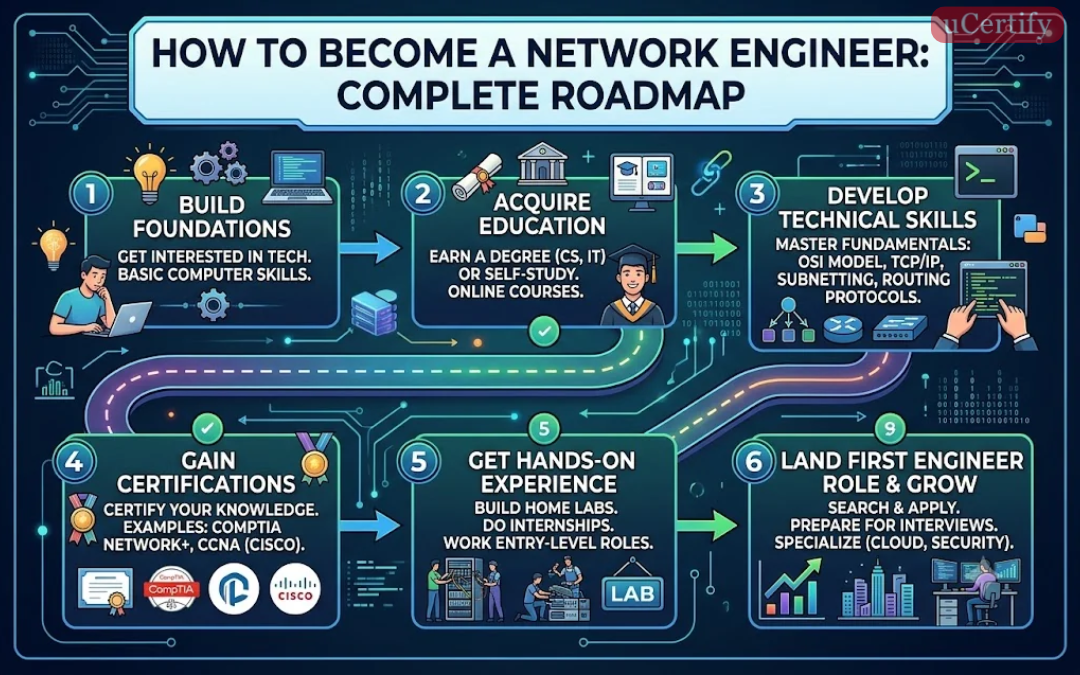
How to Become a Network Engineer: A Step-by-Step Roadmap
Step 1: Learn the Fundamentals of Computer Networking
Start by understanding how devices communicate before moving to advanced configurations. You do not need to master every protocol immediately, but you should understand the concepts that explain ordinary network activity.
IP addressing and subnetting help identify devices and determine which addresses belong to the same network. Subnetting divides a larger address range into smaller networks, allowing administrators to organize devices and manage traffic more effectively.
Switching and routing perform different jobs. A network switch commonly forwards Ethernet frames within a local network using MAC addresses. A router forwards IP packets between networks using routing information.
DNS and DHCP also serve different purposes. DNS helps resolve names such as example.com to relevant records, including IP addresses. DHCP automatically provides network configuration, which may include an IP address, subnet mask, default gateway, and DNS server information.
You should also understand the OSI and TCP/IP models, along with common protocols such as TCP, UDP, HTTP, HTTPS, and ICMP.
Rather than memorizing these terms independently, connect them to a real activity. When you open a website, your device may use DNS to resolve the hostname, establish a transport connection, and send traffic through one or more routers toward the destination.
Your first milestone: Explain how a device receives an IP address, communicates with another device on its local network, and reaches a destination on a different network.
Step 2: Get Comfortable with Networking Tools and Devices
Once you understand the concepts, practise using the tools that help network professionals inspect and troubleshoot connections.
| Tool | What it helps you investigate |
| ping | Whether a destination responds to ICMP echo requests |
| tracert or traceroute | The network path revealed by traceroute probes |
| ipconfig or ip | Local network interface configuration |
| nslookup | DNS queries and name-resolution results |
| Wireshark | Network packets and protocol exchanges |
Each tool provides evidence, but none tells the whole story in every situation. For example, a failed ping does not automatically prove that a device is offline. A firewall may block ICMP while allowing normal application traffic.
You should also learn the basic roles of routers, switches, wireless access points, firewalls, and network interface cards. Understanding where each device fits into the network makes troubleshooting easier.
You can practise these skills with network simulators and virtual lab environments. Physical equipment can be useful later, but it is not a requirement for your first networking exercises.
Your second milestone: Inspect a device’s network configuration, test connectivity, investigate a DNS query, and explain what each result does—and does not—tell you.
Step 3: Build Hands-On Networking Skills
Reading about networking explains the concepts; configuring a network shows whether you can apply them. Begin with small exercises and increase their complexity as your understanding improves.
Start by connecting two simulated computers through a switch. Assign each computer an IP address in the same subnet and test connectivity. Next, change one setting deliberately and investigate the result.
After that, practise subnetting, VLAN configuration, routing between networks, access control lists, and basic wireless security. Document the purpose of each exercise instead of recording commands alone.
A useful troubleshooting exercise should have four parts: the expected result, the observed result, the evidence you collected, and the corrective action.
Practical lab: Diagnose an IP configuration problem
Objective: Understand how an incorrect subnet mask can interfere with communication.
Setup: Use two simulated PCs connected to the same switch. Assign PC-A the address 192.168.10.10/24 and PC-B the address 192.168.10.20/24.
Test 1: Attempt to ping PC-B from PC-A. With the interfaces and simulation configured correctly, the devices should be able to communicate locally.
Test 2: Change PC-A’s subnet mask to 255.255.255.192, while keeping its address at 192.168.10.10. PC-A now treats 192.168.10.20 as part of a different subnet because the first address belongs to 192.168.10.0/26, whereas the second belongs to 192.168.10.0/26 only if calculated incorrectly? Let’s calculate carefully: 192.168.10.20 is in the 192.168.10.0/26 range, so this change alone does not cause a subnet mismatch. Instead, use PC-B at 192.168.10.100/24. Under a /24 mask, both PCs are on the same subnet. Under a /26 mask, PC-A is on 192.168.10.0/26 and PC-B is on 192.168.10.64/26.
Test 3: Repeat the connectivity test and inspect the configuration. PC-A now treats PC-B as being on a different network. Without an appropriate gateway and routing setup, communication fails.
Correction: Restore PC-A’s subnet mask to 255.255.255.0 and test again.
What you should learn: A subnet mask affects how a device determines whether a destination is local or must be reached through a router. The important skill is not merely correcting the setting; it is explaining why the setting changed the result.
This example is also a reminder to calculate address ranges carefully before drawing conclusions during troubleshooting.
Step 4: Choose the Right Networking Certification
Certifications can help demonstrate structured knowledge, especially when your work experience is limited. The best choice depends on your starting point, learning objectives, budget, and target job.
Cisco Certified Support Technician (CCST) Networking
CCST Networking is worth considering if you are new to networking and want an entry-level credential that covers foundational networking knowledge. Review the current objectives on Cisco’s official certification website before beginning exam preparation.
Cisco Certified Network Associate (CCNA)
CCNA is a widely recognized option for learners who want a more comprehensive foundation in networking. Its curriculum covers areas such as network fundamentals, network access, IP connectivity, IP services, security fundamentals, and automation and programmability.
CompTIA Network+
Network+ is another option for people seeking vendor-neutral networking knowledge. It is useful to investigate if you want to understand networking concepts that apply across different technologies and vendors.
Cisco Certified Network Professional (CCNP) Enterprise
CCNP Enterprise is intended for professionals pursuing more advanced enterprise networking expertise. It is generally more appropriate after you have established a strong foundation and gained practical experience.
You do not need to earn all these certifications. Review job advertisements in your target market, identify the credentials employers request, and select a realistic next step.
Most importantly, combine exam preparation with practical labs. A certificate may demonstrate knowledge, but the ability to explain and troubleshoot a network is what turns that knowledge into a useful skill.
Step 5: Explore Network Security, Cloud, and Automation
Once the fundamentals are secure, consider which part of networking interests you most.
Network security: Learn firewall rules, access control lists, network segmentation, secure remote access, and basic threat detection. These concepts help protect infrastructure and control how devices communicate.
Cloud networking: Explore virtual networks, subnets, route tables, gateways, and security groups. Cloud networking applies many familiar networking principles to virtual infrastructure, but the configuration and management tools differ from traditional hardware environments.
Network automation: Learn basic Python scripting and understand how APIs can be used to interact with network devices and services. Tools such as Ansible can help automate repetitive configuration and operational tasks.
These areas overlap, but you do not need to learn them all at once. Start with the fundamentals, practise troubleshooting, and choose a specialization when you have enough experience to understand what the work involves.
Step 6: Build Projects and Apply for Entry-Level Roles
A common difficulty for beginners is proving their skills without previous employment as a network engineer. Personal projects can provide useful evidence, provided you document what you actually built and tested.
Consider these projects:
Project 1: Small office network
Design a network for a fictional office. Create a topology, assign IP addresses, and explain how devices communicate. Include a clear diagram and a short description of the design choices.
Project 2: VLAN segmentation
Create two VLANs for separate departments in a simulator. Test communication within each VLAN, then investigate what is required for communication between them. Document the role of Layer 3 routing.
Project 3: Network troubleshooting report
Create a simulated connectivity problem and record the symptoms, commands used, evidence collected, root cause, corrective action, and final test results.
Project 4: Basic monitoring script
If you have learned Python, create a simple script that checks the availability of a list of authorized lab devices or endpoints. Explain its limitations and how you validated the output.
For each project, include the objective, tools, topology, configuration, test results, and lessons learned. Avoid presenting a simulated exercise as production experience.
You can then look for positions such as IT support technician, help desk technician, network support technician, or junior network administrator. These roles can provide experience with user connectivity issues, network monitoring, incident handling, and infrastructure maintenance.
Some candidates may qualify for junior network engineering positions directly. Others may benefit from starting in a related IT role and building experience before progressing.
Step 7: Prepare Your Résumé and Technical Interviews
Your résumé should show what you can do, not simply list networking terms.
Instead of writing “Knowledge of IP addressing and routing,” describe a real project in which you configured addressing, tested connectivity, and diagnosed a routing or configuration problem.
Include relevant certifications, technical skills, lab projects, internships, and work experience. Be clear about whether a project used simulated equipment, physical hardware, or a production environment.
Prepare for questions about subnetting, DNS, DHCP, switching, routing, VLANs, and troubleshooting. You should be able to explain not only the definition of a technology but also how you would investigate a problem involving it.
For example, if an interviewer asks why a computer can access local resources but cannot open a website, explain how you would examine its IP configuration, test the gateway, investigate DNS resolution, and distinguish between connectivity and application-layer problems.
You will not always need to follow exactly the same sequence. The symptoms and evidence should determine the next diagnostic step.
Employers value candidates who can communicate their reasoning, recognize uncertainty, and avoid making changes before they understand the problem.
Network Engineer Skills Checklist
Before applying for entry-level networking positions, assess your ability to complete these tasks independently.
- Explain the OSI and TCP/IP models.
- Configure IP addresses and calculate basic IPv4 subnets.
- Explain the roles of DNS, DHCP, switches, and routers.
- Use basic command-line tools to investigate connectivity.
- Configure and test a small simulated network.
- Explain how VLANs separate network traffic and when routing is required.
- Diagnose a deliberate configuration error and document the correction.
- Complete at least two networking projects with clear evidence of the work.
- Explain your projects and troubleshooting decisions in an interview.
This checklist is a readiness guide, not a formal industry certification. You can apply for suitable entry-level positions while continuing to improve the skills you have not yet mastered.
How Long Does It Take to Become a Network Engineer?
The time required depends on your previous experience, the time you can dedicate to learning, and the responsibilities of your target role. Someone with IT support experience may already understand operating systems, user issues, and basic troubleshooting. A complete beginner may need additional time to establish those foundations.
The following is an illustrative study plan, not a promise of employment within a particular period.
| Learning phase | Suggested timeframe | Measurable milestone |
| Networking fundamentals | Weeks 1–4 | Explain addressing, subnetting, DNS, DHCP, switching, and routing |
| Tools and guided labs | Weeks 5–8 | Test connectivity and diagnose basic configuration errors |
| Projects and certification preparation | Weeks 9–12 | Complete a documented network project and review relevant exam objectives |
| Job preparation | Week 13 onward | Refine the résumé, practise interviews, and apply for suitable roles |
The phases can overlap. Some learners will need more time, particularly when learning alongside work or college.
Measure progress by what you can demonstrate. Can you configure a small network, identify a likely cause of a failure, verify a correction, and explain your findings? These are more meaningful milestones than simply counting the hours spent watching tutorials.
Network Engineer Salary and Career Growth
Network engineer salaries vary by country, city, employer, experience, and specialization. A beginner in a support position should not expect the same compensation as an experienced engineer responsible for a large enterprise network or complex cloud infrastructure.
For a realistic salary estimate, compare recent job advertisements in your target location. Separate entry-level roles from positions that require several years of experience, advanced certifications, or specialized security and cloud skills.
Look beyond the job title. Two advertisements for network engineers may describe very different responsibilities, and those differences can affect compensation.
With experience, networking professionals may move into senior network engineering, network architecture, network security, cloud networking, automation, or infrastructure leadership.
The right direction depends on your interests and strengths. If you enjoy designing network layouts and solving routing problems, enterprise networking may appeal to you. If you prefer securing infrastructure, network security could be a better fit. If you enjoy scripting and eliminating repetitive work, automation may be worth exploring.
Common Mistakes to Avoid When Learning Networking
One common mistake is relying entirely on videos and notes. You may recognize a definition but struggle to diagnose a configuration problem when the symptoms are unfamiliar. Regular lab practice helps close that gap.
Another is learning commands without understanding the results. Running ping is easy; interpreting a failed response in context takes more thought. Always ask what a command proves, what it cannot prove, and which test would help narrow down the cause.
Beginners can also lose time by pursuing too many specializations at once. Learning networking, cloud computing, cybersecurity, and automation simultaneously may leave gaps in the fundamentals. Build a solid base before adding advanced topics.
Finally, do not assume you must master every technology before applying for a job. Review actual entry-level job requirements, compare them with your skills, and address the most important gaps while applying for roles that fit your current abilities.
Knowledge Check: Test Your Understanding
Before moving on to more advanced networking topics, see whether you can answer these questions:
- What is the difference between DNS and DHCP?
- Why does a device need a default gateway to communicate with destinations outside its local subnet?
- Why might a ping fail even when a destination is available through a web browser?
- What additional networking function is generally needed for devices in separate VLANs to communicate?
- What information should a useful troubleshooting report include?
If you cannot answer all five questions yet, revisit the relevant sections and practise the concepts in a lab. The goal is not to memorize the answers but to explain the reasoning behind them.
Conclusion
Learning how to become a network engineer involves more than studying protocols or collecting certifications. You need to understand how devices communicate, practise configuring networks, troubleshoot problems methodically, and demonstrate your skills through projects.
Start with IP addressing, subnetting, DNS, DHCP, switching, and routing. Learn to use basic diagnostic tools, then progress to VLANs, routing configurations, and network security. Choose a certification that matches your goals, document your practical work, and begin exploring relevant entry-level opportunities.
Your first networking project does not need to be complicated. A small simulated network with a clear objective, a deliberate fault, and a documented solution can teach you how to think through a technical problem.
Start small, test your assumptions, and record what you learn. That approach will help you build the technical foundation and practical confidence needed to pursue a career in network engineering.




No Comments Yet
Be the first to share your thoughts on this post!